A shoppable Instagram feed for your website
Tag the products in your Instagram photos. Visitors click a photo, see each product with a link, and go straight to your store. It works on Shopify, WordPress, Squarespace and any site that takes an embed code.

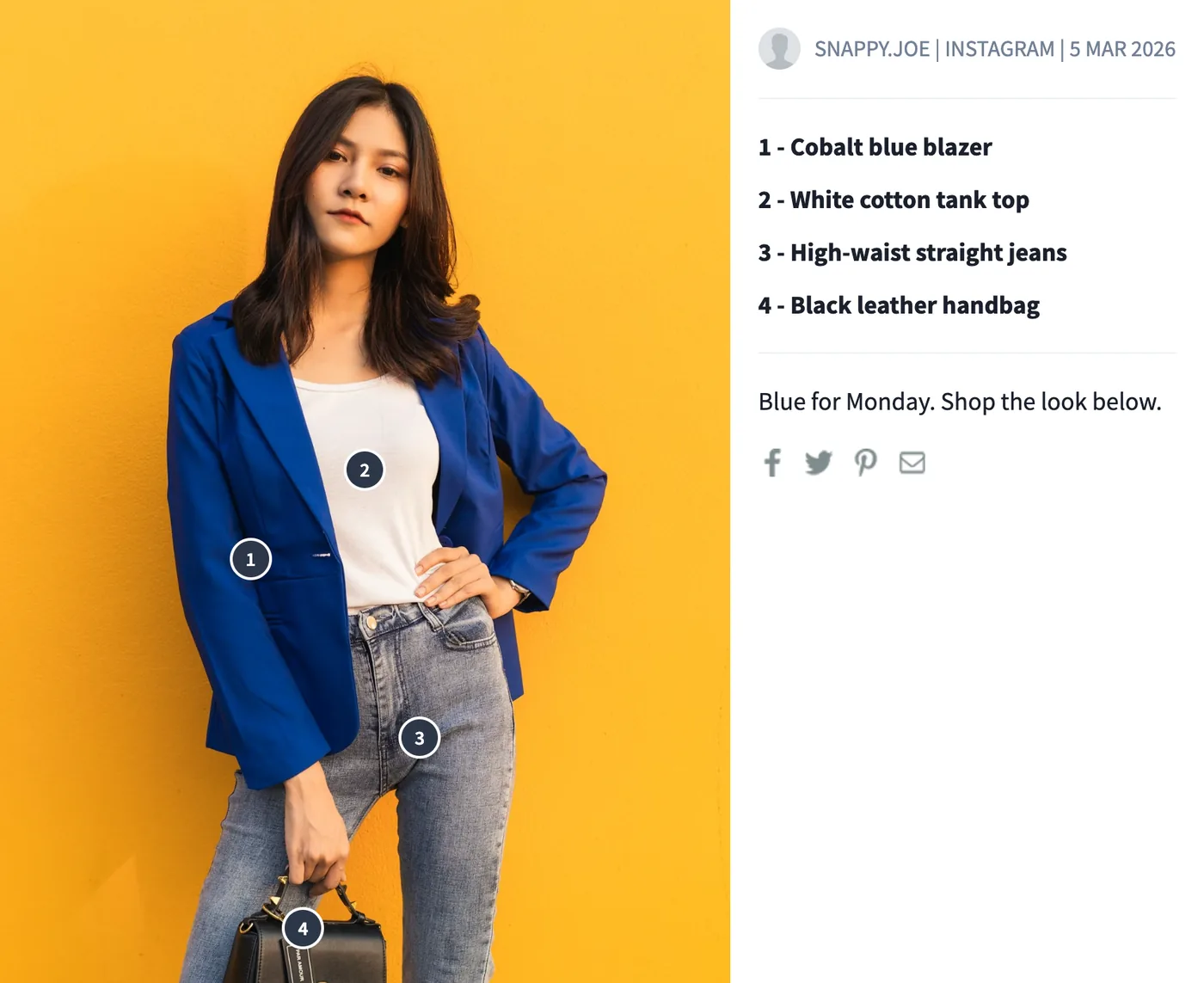
How do I create a shoppable Instagram feed on my website?
Create a paid Instagram widget in SnapWidget, then open Shoppable in your dashboard. Click each product in a photo and add the link to its product page and a short description. On the widget's Advanced tab, set Photo Link to Shoppable (Lightbox), then paste the new embed code on your website. A click on the photo shows your products in a numbered list. Shoppable Images are on every paid plan, from $8 a month.
How do you make your Instagram feed shoppable?
-
1
Create a paid Instagram widget
Start a paid plan or its 14-day free trial. Then create an Instagram widget with the grid, board, slideshow or scrolling layout. Shoppable links work on pro widgets, which come with paid plans.
-
2
Open Shoppable and choose the widget
In the dashboard menu, select Shoppable. Choose your widget from the list, and its recent posts show below.
-
3
Click a product and add its link
Click the product in the photo. Enter the link to its product page and a short description, such as the product name, then click Add Link. Add one link for each product in the photo.
-
4
Set Photo Link to Shoppable (Lightbox)
Open the widget in your dashboard. On the Advanced tab, set Photo Link to Shoppable (Lightbox). To change the Shop This text, edit Shoppable Hover Text. Click Update & Get Widget and copy the code.
-
5
Paste the new code on your website
Paste the code where you want the feed, or replace the old code of this widget. The new code adds the script and stylesheet that the lightbox needs, so keep every line. Tagged photos show Shop This when a visitor points at them.

What do shoppers see on your website?
Since 2016, SnapWidget customers have tagged products in more than 18,000 posts.
- Shop This on tagged photos
- Photos with product links show a Shop This button when a visitor points at them. You can change the text, for example to Shop the look.
- Numbered pins and a product list
- A click opens the photo in a lightbox on your page. Each product has a numbered pin on the photo and a numbered link with your description next to it.
- Links to any store
- A product link can go to any web address: your Shopify, WooCommerce or Squarespace store, or any other shop. You need no product catalog and no Instagram Shop.
- One click to the product
- For a photo with one product, set Make entire image clickable to Yes when you add the link. A click on that photo then opens the product page in a new tab, with no lightbox.
How much does a shoppable Instagram feed cost?
SnapWidget includes Shoppable Images on every paid plan, from $8 a month, with no view limit. EmbedSocial lists shoppable widgets on its free plan, which allows 500 views a month. Taggbox and Tagembed start shoppable widgets at $39 a month. Smash Balloon puts shoppable feeds on Elite, at $149 for the first year, and works on WordPress only.
| Tool | Shoppable from | Price | What shoppers get |
|---|---|---|---|
| SnapWidget | Shoppable from: Lite | Price: $8/mo, 14-day free trial | What shoppers get: A numbered pin on each product and a product list in a lightbox. No view limit. |
| EmbedSocial | Shoppable from: Free | Price: $0. Pro is $29/mo | What shoppers get: Product tags on Instagram posts. The free plan allows 500 views a month and shows a branding banner. |
| Taggbox | Shoppable from: Growth | Price: $39/mo, or $29/mo billed yearly | What shoppers get: A shoppable widget with product tags. 50,000 views a month. |
| Tagembed | Shoppable from: Growth | Price: $39/mo, or $29/mo billed yearly | What shoppers get: A shoppable widget with product hotspots. 50,000 views a month. |
| Smash Balloon | Shoppable from: Elite | Price: $149 for the first year, then $298 a year | What shoppers get: A link from a URL in the Instagram caption. WordPress only. |
| Flockler | Shoppable from: Not stated | Price: Plans from $129/mo | What shoppers get: Product tags from a Google Merchant feed or a Shopify store. |
| Curator.io | Shoppable from: Paid add-on | Price: No price listed | What shoppers get: Shoppable Posts, sold separately. |
Checked on each vendor's pricing page on 13 October 2026. Prices are in US dollars, billed monthly unless the row says otherwise. SnapWidget makes this page, and we list SnapWidget first.
Which website builders does it work on?
Any site where you can paste HTML. These guides show where the code goes.
-
Shopify
Add a Custom Liquid or Custom HTML section to your theme. No app needed.
-
WordPress
Paste the code into a Custom HTML block. No plugin needed.
-
Squarespace
Paste the code into an Embed block as a Code Snippet.
-
Webflow
Add an Embed element and publish. Custom code needs a site plan.
-
Any website
Paste the code into the HTML of any page. No plugin.
Want every click? Our help center has the step-by-step install guide with screenshots.
Read the install guideLoved by 200,000+ websites
Don't just take our word for it. See all reviews →
Frequently asked questions
It is a gallery of your Instagram posts on your website where each photo links to the products in it. A visitor clicks a photo, sees the products and goes to the product page to buy.
No. You enter the link to each product page yourself, so any web address works. SnapWidget does not read the product tags that you add in the Instagram app.
Yes. Click each product in the photo to add its link. The lightbox numbers the products in the order you added them and lists them next to the photo.
Every paid plan: Lite at $8 a month for 1 pro widget, Pro at $14 a month for 20 pro widgets and Developer at $99 a month for 250. Each paid plan starts with a 14-day free trial. Free widgets cannot be shoppable.
Instagram and Facebook pro widgets with the grid, board, slideshow or scrolling layout. The feed and popup layouts do not have the Shoppable (Lightbox) option.
Yes. On the Shoppable page, click Update All. SnapWidget copies the links of the selected widget to your other pro widgets that show the same account, and replaces the links those widgets had.
You do not need an app. SnapWidget is an embed code that you paste into a Custom Liquid section of your theme, and Shoppable Images tag your products from $8 a month. Our Shopify guide shows each step.
Check that you pasted the new code after you set Photo Link to Shoppable (Lightbox). The lightbox needs the script and stylesheet lines in that code. Some editors remove them, such as the WordPress Classic editor in the Visual tab and free Elementor. Our guides for those editors show the fix.
Keep exploring
- Instagram widget Six layouts for your posts. Five of them are free. Learn more
- Instagram feed widget A feed like your profile, with a Follow button. Paid plans. Learn more
- Instagram grid widget Square or 3:4 tiles in the columns and rows you choose. Free. Learn more
- Instagram scrolling widget One row of posts that scrolls in an endless loop. Free. Learn more