Add your Instagram feed to Blogger
Put your Instagram feed in a Blogger post, a page or the sidebar. Paste the embed code in HTML view or into an HTML/JavaScript gadget.







How do I add an Instagram widget to Blogger?
In your Blogger dashboard, go to Layout, click Add a Gadget and choose HTML/JavaScript. Paste your SnapWidget embed code and save, and the feed shows in your sidebar or footer. For a post or page, paste the code in HTML view instead. Free Instagram widgets work and refresh every 15 minutes.
Step by step: adding the widget to a Blogger page or post
-
1
Create your widget and copy the code
Create your widget in SnapWidget and click Install Widget, then Copy Code.
-
2
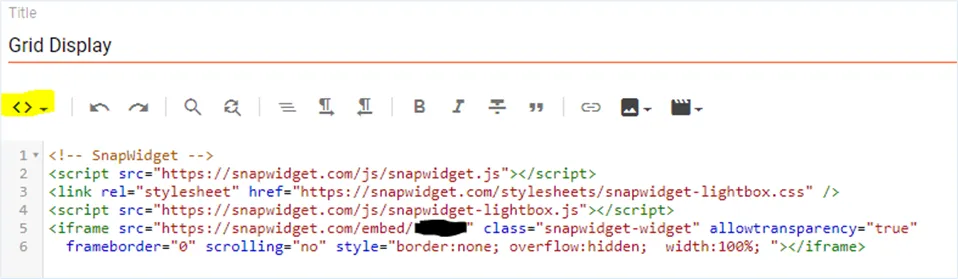
Open the page in HTML view
In your Blogger dashboard, select Pages in the left sidebar and choose the page. Select HTML view on the editor toolbar and paste the code where the widget should appear.
-
3
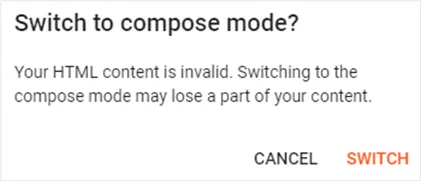
Ignore the invalid HTML warning
If you switch to Compose view, Blogger says your HTML content is invalid. It flags the stylesheet line, but the widget still displays.
-
4
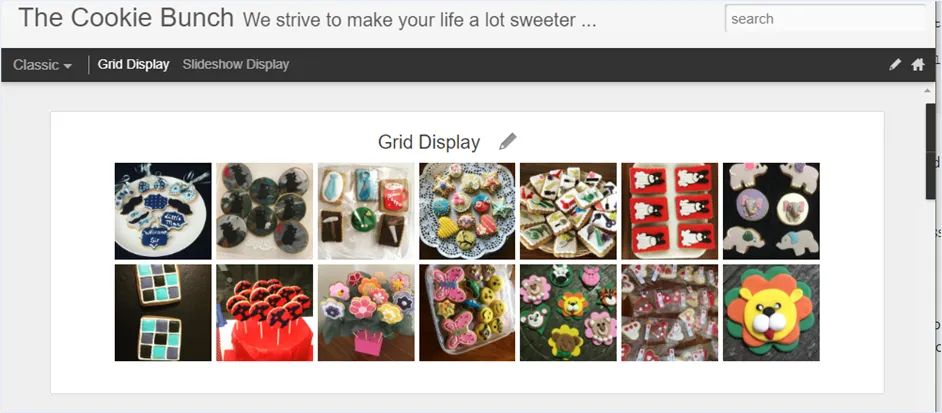
Preview and update
Click Preview to check the page, then click Update.
-
5
Add it to a blog post
Select NEW POST, add a title, select HTML view and paste the code. Click Preview, then Publish.
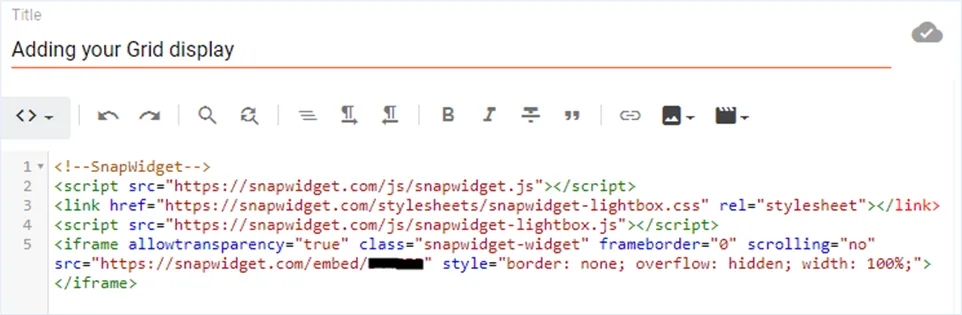
Your feed in posts, pages and the sidebar
- Posts and pages in HTML view
- Open a post or page, switch the editor to HTML view and paste the code where the feed should appear.
- Sidebar gadget
- Go to Layout, click Add a Gadget, choose HTML/JavaScript and paste the code to show your feed in the sidebar or footer.
- No gadget edits later
- When you post to Instagram, the widget on your blog shows it. You never edit the gadget or the post again.
- No theme files
- Pick a layout and photo size, check the preview, then copy the code. You never open your Blogger theme HTML.
Want every click? Our docs have the step-by-step install guide.
Read the install guideLoved by 200,000+ websites
Don't just take our word for it. See all reviews →
Frequently asked questions
In your Blogger dashboard, go to Layout, click Add a Gadget where you want the feed and choose HTML/JavaScript. Paste your SnapWidget code and save.
Yes. In the post editor, switch to HTML view and paste the code where you want the feed. Preview the post, then publish it.
No. Blogger flags the stylesheet line in the code when you switch back to Compose view, but the widget still displays. Click Preview to check it.
Yes. The widget sits inside your post, page or gadget, so it works with any Blogger theme. Turn on the responsive option and it resizes to fit the column.
Yes. Paste the same embed code into each post or page. Every copy shows the same widget, and they all update together.
Keep exploring
-
 WordPress
Paste the code into a Custom HTML block. No plugin needed.
Learn more
WordPress
Paste the code into a Custom HTML block. No plugin needed.
Learn more
-
 Shopify
Add a Custom Liquid or Custom HTML section to your theme. No app needed.
Learn more
Shopify
Add a Custom Liquid or Custom HTML section to your theme. No app needed.
Learn more
-
 Wix
Paste your widget code into an Embed HTML element.
Learn more
Wix
Paste your widget code into an Embed HTML element.
Learn more
-
 Squarespace
Paste the code into an Embed block as a Code Snippet.
Learn more
Squarespace
Paste the code into an Embed block as a Code Snippet.
Learn more